
A Saved Layout is a Visual Portfolio gallery stored on its own, outside any page, with an ID and a shortcode. Use it where the block editor is not available: Elementor, WPBakery, the Classic Editor, theme widgets, and any builder that renders shortcodes.
In the block editor, use the Visual Portfolio block directly. To reuse one gallery on several pages, turn the block into a Synced Pattern (WordPress → Patterns). Saved Layouts are for the other editors; the admin list says so in a notice.
Create a Saved Layout
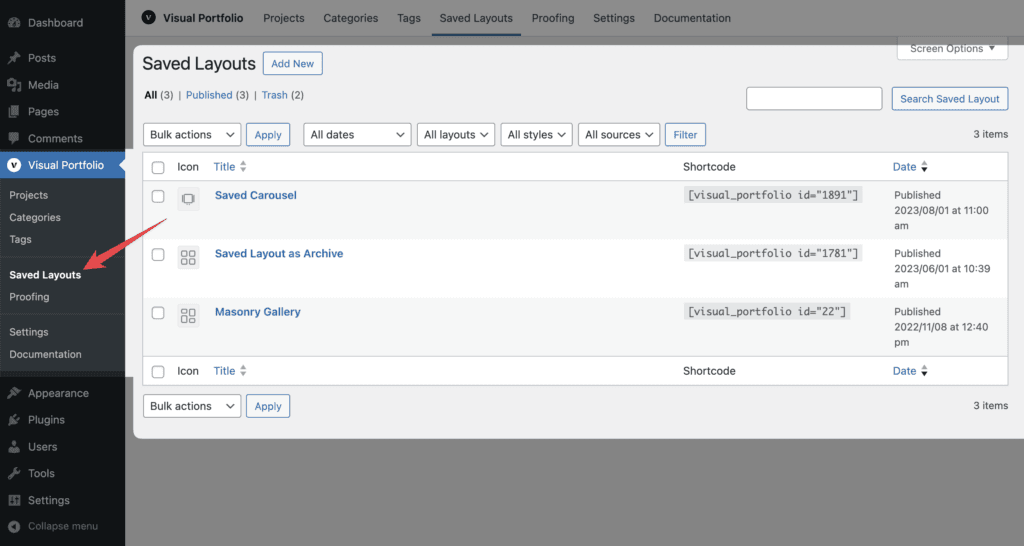
- Visual Portfolio → Saved Layouts → Add New Saved Layout.
- The editor opens with the same settings as the block: Content Source, Layout, Skin, Click Action, Custom CSS, and with Pro Protection. Give the layout a title.
- Publish. The list shows the layout’s icon and its shortcode; click the shortcode to select it.
The Saved Layouts editor always uses the block editor, even with the Classic Editor plugin active. It has one extra setting, Stretch (General Settings): breaks out of the container to full width, for builders whose containers are narrower than the page.
The list can be filtered by layout, skin and content source.
Use a Saved Layout
| Where | How |
|---|---|
| Classic Editor | Paste the shortcode, or use the Visual Portfolio dropdown button in the toolbar, which lists your layouts |
| Elementor | The Visual Portfolio widget with a Saved Layout dropdown |
| WPBakery | The Visual Portfolio element with a Select Layout dropdown |
| Other builders (Divi, Beaver Builder, Brizy, Bricks, Oxygen, Breakdance, SiteOrigin, Avada, Thrive, Cornerstone, Themify, …) | Their shortcode or text module with the shortcode |
| Block editor | The Visual Portfolio Saved Layout block, or paste the shortcode into a Shortcode block. Prefer the Visual Portfolio block itself |
| Theme widgets, template files | echo do_shortcode( '[visual_portfolio id="123"]' ); |
The attributes of each shortcode are on Shortcode reference.
When a page uses Saved Layouts, the front-end admin bar shows a Visual Portfolio menu with links to edit them (for users who can edit Saved Layouts).
Who can edit Saved Layouts
Administrators and users with the Portfolio Manager role. Editors and Authors cannot; see Roles and capabilities.
Translation
With WPML, Saved Layouts are translatable posts; the texts inside them (image titles and descriptions, the “All” filter text, pagination labels, date formats, the no-items notice) are registered for translation. See Multilingual.