
Table of Contents
Pro Feature
This is a part of the Visual Portfolio Pro plugin.
Purchase the Pro plugin to access this and other advanced features.
Shows the imported posts of a connected account, or of a source you pick for that account. Connect the account first in Settings → Social Feeds.
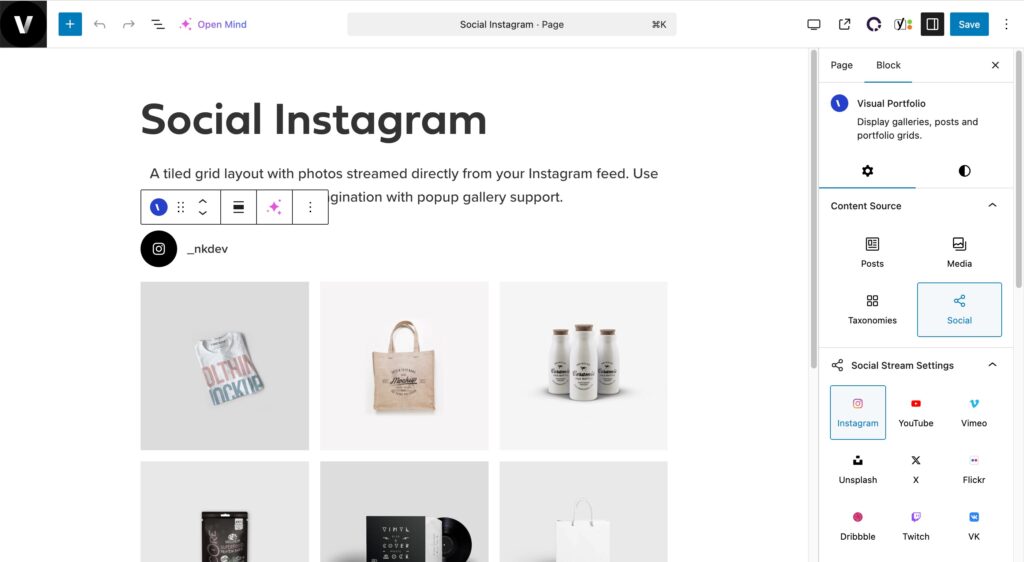
Settings
| Setting | Values | Default |
|---|---|---|
| Network | Instagram, YouTube, Vimeo, Unsplash, X, Flickr, Dribbble, Twitch, VK, RSS | |
| Account | The accounts connected for that network. Connect New Account opens the settings | |
| Source (YouTube, Vimeo, Flickr, VK, Twitch, Unsplash) | What the gallery shows from the account, and the fields of that kind | What the account shows |
| Display Profile, Display Profile Photo, Display Profile Name (Instagram) | on / off | on |
| Order by | Date, Title | Date |
| Order Direction | ASC, DESC | DESC |
Items Per Page applies as for other sources; All Items shows up to the account’s Max setting. The Filter element has nothing to list for social items. Display Comments Count is available for YouTube, Vimeo and Flickr; Display Views Count for YouTube and Flickr.
Choose the source
Available in Visual Portfolio Pro 3.9.0 and later.
For YouTube, Vimeo, Flickr, VK, Twitch and Unsplash, the account holds only the login or the keys. Each gallery picks what it shows in Source, under Account. Two galleries can use one account and show different playlists, showcases, albums, groups, channels or searches.
- In the block, under Account, select the account. If you select another account later, Source and its fields are emptied, because a playlist or an album belongs to one account.
- In Source, select what the gallery shows. The fields of that kind appear below.
- Fill the fields. A text field applies when you leave it or press Enter, and the preview updates.
The first option of Source says what the gallery shows when you pick nothing:
| First option | When you see it | What the gallery shows |
|---|---|---|
| Default: and a kind, such as Default: Channel videos | YouTube and VK accounts | The channel videos (YouTube) or the wall (VK) |
| As in connection: and a source | Accounts saved with a source in the settings | That source |
| Choose a source | Vimeo, Flickr, Twitch and Unsplash accounts saved without a source | Nothing until you pick a source |
| As in connection | No account is selected yet | Nothing |
A gallery saved without a source keeps the first option, so it shows what its account shows.
Lists of playlists, showcases, albums and groups
Some fields list what the account has: YouTube playlists, Vimeo showcases, Flickr albums and VK groups. Select an item, or select Enter manually… and enter it in ID or URL. If the list cannot load, the block shows “The list did not load.” and the network’s reason, and a field where you enter the value.
The pages of each network list the fields and the values they accept: YouTube, Vimeo, Flickr, VK, Twitch, Unsplash.
Preview of a new source
The first time the editor previews a YouTube, Vimeo, Flickr, VK or Twitch source, it fetches that source. The preview shows the first page of posts and downloads up to 12 of their images right away. The other posts and images are imported in the background.
If the fetch fails, the preview shows the network’s error message in place of the items. The editor tries again when the preview updates five minutes or more after the failure.
If another sync is running, the preview shows “This source is still loading. Reload the editor in a minute.”
Unsplash photos always come straight from Unsplash. Instagram, X, Dribbble and RSS previews do not fetch: these accounts import after you save them in the settings.
How the import works, what is stored and how often it refreshes: Social Feeds.